PassMatch compares every valid badge read with the number of people an Axis camera counts walking through the same door. When someone follows without a badge, it raises an alarm in your access control system within a second.
An access control system knows a valid card was presented. It has no idea whether one person walked in or three.
Holding the door for the person behind you is polite and common. It also defeats the whole point of the badge reader.
PassMatch flags the extra person at the door, in real time, in the system your guards already watch.
The badge count comes from your access control panel over a pair of wires. The people count comes from the camera's own on-board analytics. A small program on a local PC compares them.
The panel pulses a spare auxiliary relay on "access granted". The I/O device counts the pulse and tells the monitor.
The Axis camera counts each person crossing the door line with its on-board analytics and sends the count.
Each badge is good for one person within the door's delay (for example 12 s). Every person uses one badge.
A person with no badge left pulses an I/O device relay into a spare alarm input. Guards see "Tailgate – Front Door".
Only a badge starts a timer. A person who walks in with no badge is a tailgate on their own and never uses up the next person's badge.
| Time | Event | Result |
|---|---|---|
| 09:25:33 | Badge Front Door, delay 12 s | Badge good until 09:25:45 |
| 09:25:36 | Person walks in | OK uses the badge |
| 09:25:41 | Person follows right behind | Tailgate 2 people, 1 badge · alarm sent |
| 09:26:10 | Person walks in, no badge read | Tailgate 1 person, 0 badges · alarm sent |
| 09:27:02 | Badge Badge two people badge in 3 s | Both badges good for 12 s |
| 09:27:09 | Person Person | OK 2 people, 2 badges |
The camera, the I/O device and the monitor talk over the building's LAN. The access control panel is connected by wires only, with no network link and no software integration.
Optional email alerts can use a mail server on the local network. Nothing has to leave the building.
The camera counts people on its own processor, the I/O device counts badge pulses, and the monitor compares them on a local PC. There is no cloud service, no subscription and no outside connection. It keeps working when the internet is down.
The camera sends only numbers, never video. The monitor stores counts and events, not images.
The access control system connects with two dry-contact pairs per door: a spare auxiliary relay out, a spare alarm input in. There's no API, no driver, no integration license and no change to the panel's firmware or network.
That keeps the access control system's cybersecurity boundary exactly as it is, makes IT approval simple, and works with Mercury-based panels and most other panels that have a spare relay and input.
As installed and tested with a Mercury panel. The second, third and fourth doors on the same I/O device repeat the pattern on inputs and relays 2–4.
Program it to pulse on "access granted" for that door. Not the lock or strike relay, which also fires on request-to-exit and held-open.
Every signal crosses a relay contact, so the panel and the I/O device stay electrically separate. Their grounds don't need to be joined.
Set the panel input as a normally-open alarm point, with the end-of-line resistors your input configuration uses.
PassMatch only watches and reports. It never decides whether a door locks or unlocks, and it is wired so it can't.
Exit hardware, request-to-exit and fire-alarm release are not connected to it. People leave exactly as before.
If the PC, camera, I/O device or network stops, doors and access control keep working normally. You only lose the tailgate alarm, and the monitor reports the device as down.
12–24 VDC signal circuits through relay contacts rated 1 A. No mains wiring at the door.
No video leaves the camera, and nothing is stored but counts and times.
| Door circuit | Connected? |
| Lock / strike / maglock power | No |
| Request-to-exit (REX) | No |
| Fire alarm door release | No |
| Panic / exit hardware | No |
| Door position contact | No |
| Spare AUX relay (listen only) | Yes |
| Spare alarm input (report only) | Yes |
Install by a qualified installer to the panel maker's instructions, local codes and the authority having jurisdiction. Use spare panel points only.
PassMatch is a small, closed system on your own LAN. It talks only to the devices you list, accepts nothing from the outside, and never touches the access control system's network.
| Port | Direction | From / to | Purpose |
|---|---|---|---|
| 8080 | In | I/O devices only | Badge counts |
| 1883 | In | Cameras only | People counts |
| 8081 | In | Guard and admin PCs | Live web page (sign-in) |
| 80 | Out | I/O devices and cameras | Alarm pulse, health check, camera reconnect |
| 587 / 465 / 25 | Out (optional) | Your mail server | Email alerts |
Put the cameras, I/O devices and monitor PC on a security VLAN, and allow each port only from the device addresses above (step-by-step firewall rules are in the install guide). Traffic on the LAN is not encrypted today, so keeping it on a security VLAN is the right place for it. Encrypted connections are on the roadmap.
Guards and admins sign in from any PC on the network. Filter by site with NYC* or pick one door, switch to tailgates only, or look back over any date range and download it for Excel.
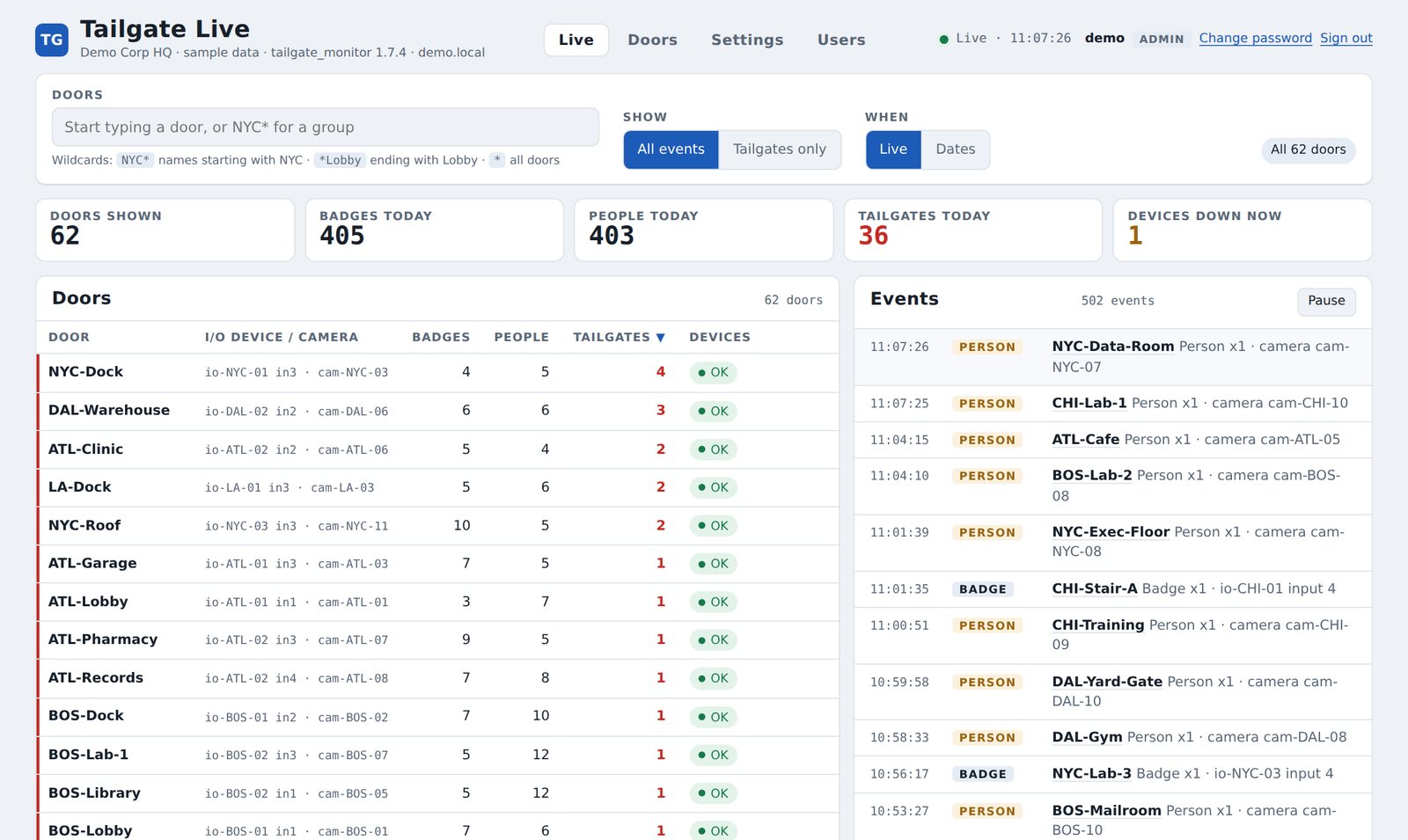
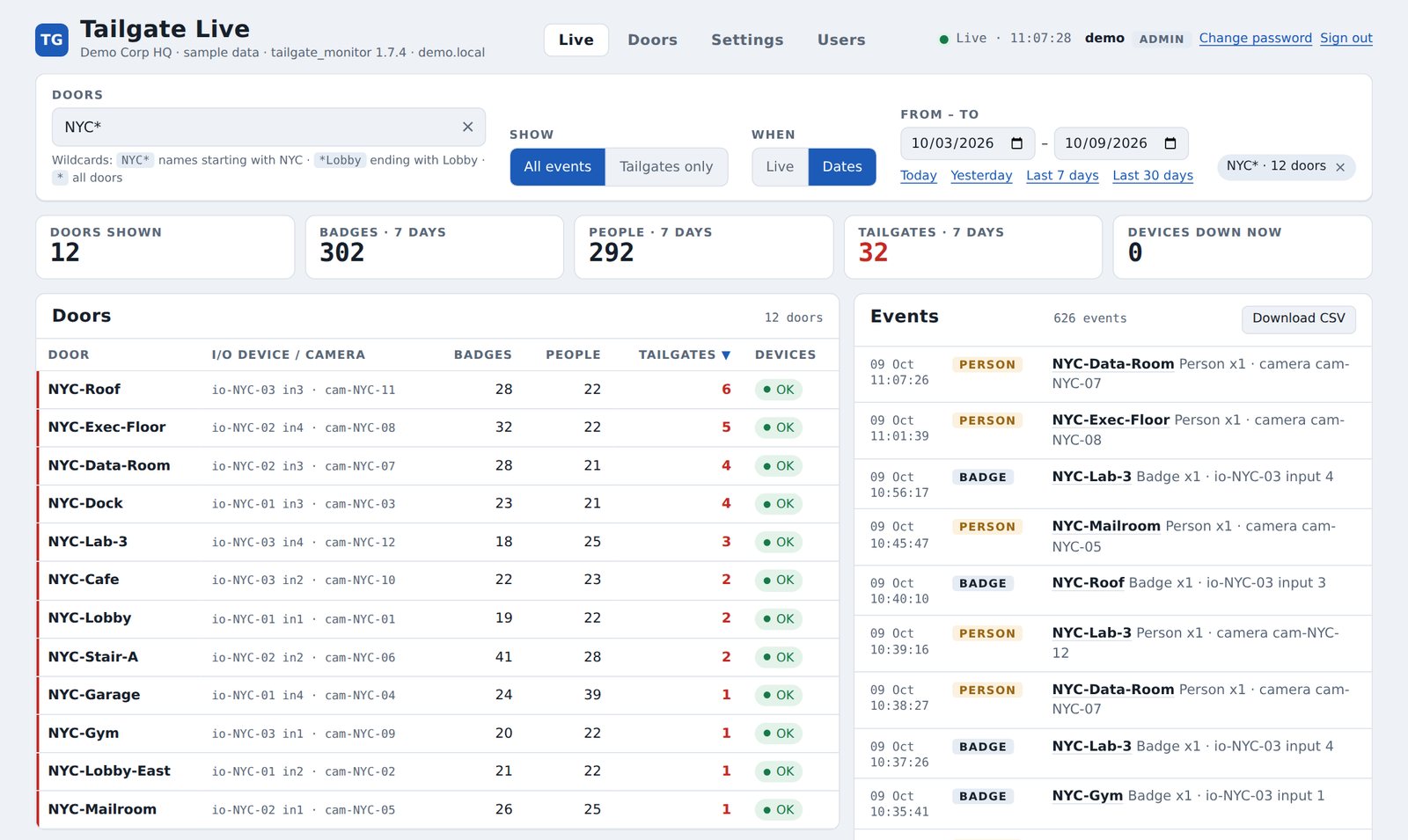
A tailgate shows up as an alarm point in the access control software your guards already watch.
Every door with today's badges, people and tailgates. Filter by site with NYC*, or pick one door.
Pick any date range, see every event and download it for Excel. Weekly tailgate reports are kept automatically.
Every camera and I/O device is checked each minute. A device that drops off is flagged on screen and by email.
Optional emails for tailgates, devices down and a daily summary, through a mail server you choose.
Viewers watch. Admins edit doors and settings in the browser, with every change checked, backed up and logged.
Overhead or angled at the door, "crossline counting" scenario. Tested with the Axis P3288-LVE.
4 counting inputs and 4 relays on the network. PoE-powered models available.
One auxiliary relay (access granted) and one alarm input (tailgate).
Any always-on Windows PC or server, or a small Linux PC. No internet connection needed.
Standard low-voltage installation materials.
| Alarm time | Under 1 second from the person crossing |
| Doors | 1 to 100+ per monitor |
| Delay per door | Set per door, e.g. 5–15 s |
| CPU | Under 1% of one core at 100 busy doors |
| Memory | About 35–40 MB |
| Network | About 1 KB per badge or person |
| Internet | None |
| Event history | Kept 90 days by default (adjustable) |
| Ports (local only) | 8080 I/O devices · 1883 cameras · 8081 web page |
We can install PassMatch on a single door alongside your existing access control, with no changes to how the door works, and show you the tailgates it catches.